Tag Archives: email deliverability

Monitoring Your Email Reputation with Microsoft Smart Network Data Services

Standard blacklist monitoring tells you whether your sending IPs appear on public RBLs. It doesn’t tell you how Microsoft specifically views your mail. That’s a separate reputation system, and it matters a lot: Outlook.com, Hotmail, and MSN together represent a significant share of consumer email. Generator Labs now integrates directly with Microsoft Smart Network Data Services (SNDS) inside your blacklist monitoring dashboard.

What SNDS Provides

SNDS is a free Microsoft program that gives senders data about mail flowing from their IP addresses into Microsoft’s mail infrastructure. The metrics it returns include:

  • Message volume from each IP
  • Spam complaint rate
  • Spam trap hits
  • Overall IP status (Green / Yellow / Red)
  • Filter result breakdown

A Red status from SNDS means Microsoft is actively blocking or heavily filtering mail from that IP. Yellow is a warning that reputation is declining. Most teams only discover this when customers start reporting missing mail.

Why It’s Worth Monitoring Separately

SNDS status doesn’t always correlate with your RBL status. You can be clean on every public blocklist and still have a Yellow or Red SNDS rating because of complaint rates, trap hits, or sending patterns that Microsoft’s filters flag specifically. The inverse is also true: an SNDS Green rating doesn’t mean you’re clean on all public RBLs.

Treating SNDS as a separate signal, alongside your regular blacklist monitoring, gives you a more complete picture of your sending reputation and catches Microsoft-specific issues before they escalate.

Setup

Go to RBL Monitoring > SNDS in the portal and add your SNDS access key. Microsoft issues one key per registered IP range. Once connected, Generator Labs pulls your SNDS data automatically and surfaces status changes alongside your other monitoring results.

Setup instructions are in the SNDS documentation.
SPF, DMARC, and rDNS Checks Are Now Built Into Blacklist Monitoring

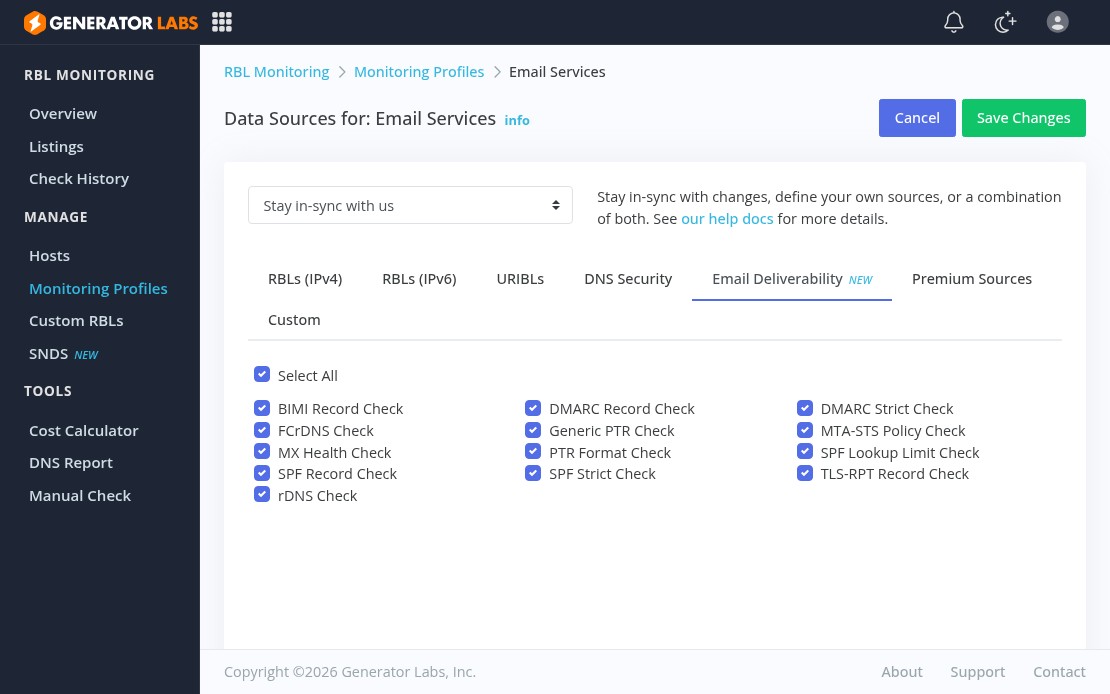
Generator Labs email deliverability checks tab showing all 13 available checks

Getting listed on an RBL is one way mail stops delivering. There’s a longer list of DNS misconfigurations that cause mail to land in spam or get silently rejected, and most monitoring tools don’t catch them. Generator Labs has added 13 email deliverability checks directly into blacklist monitoring profiles, running alongside your RBL checks and feeding into the same alert pipeline.

What Gets Checked

IP-based checks (for IPv4 and IPv6 hosts):

  • Reverse DNS (rDNS): the IP has a PTR record
  • Forward-Confirmed rDNS (FCrDNS): the PTR resolves forward back to the original IP
  • Generic PTR Pattern: the PTR doesn’t look like a dynamic or consumer hostname
  • PTR Format: the PTR has at least two labels and a valid alpha TLD

Domain-based checks (for URIBL and URI hosts):

  • MX Health: MX records exist and at least one target resolves
  • SPF Record: domain publishes a valid SPF record
  • SPF Strict: SPF uses an enforcing policy (-all or ~all)
  • SPF Lookup Limit: SPF stays within RFC 7208’s 10-lookup cap
  • DMARC Record: domain publishes a valid DMARC record
  • DMARC Strict: DMARC uses an enforcing policy (p=quarantine or p=reject)
  • TLS-RPT Record: domain publishes a TLS Reporting record
  • MTA-STS Policy: domain publishes a valid MTA-STS policy
  • BIMI Record: domain publishes a valid BIMI record

How to Enable

All 13 checks are opt-in. Go to RBL Monitoring > Monitoring Profiles > Data Sources, click the Email Deliverability tab, and enable the ones you want. None of them run unless you explicitly turn them on.

The recommended approach is a dedicated profile for your mail-sending hosts so deliverability alerts don’t mix with RBL alerts from non-mail infrastructure. Failures trigger the same notifications and webhooks as blacklist listings, so they drop straight into your existing incident workflow.

Full documentation is at docs.generatorlabs.com/email-deliverability.