My last post ended on a small, quiet machine on the shelf beside the Wi-Fi router. Six months earlier, the IEEE 802.11 working group, which writes the Wi-Fi standard, had voted to start letting the router be that machine, or at least find it for you.
What the Standard Actually Covers
Qualcomm brought the proposal, now called AI Offload, in March, co-signed by Cisco, Meta, MediaTek, Huawei, Sony, Nokia and others. A device that can’t run an AI model (the proposal’s example is “a non-AI Wi-Fi home security camera”) sends the job to a router that can and gets the answer back. It can even tell the router where to download the model, so a camera maker can ship its own AI without an AI chip in the camera.
Routers would announce the service the way they announce their network name, so a device can see what AI is on offer (text, voice, images, video) before it connects.
By July the scope had grown. The draft charter covers AI work done by the router, by another device on your Wi-Fi, or by a device plugged into your network behind the router: the box on the shelf. MediaTek has proposed how that would work: AI boxes check in with the router, and the router passes your request to whichever one can take it.
The standard covers finding the service, connecting to it, and securing the connection. The AI work itself is out of scope; Cisco’s review of the early proposals calls the model “a black box” as far as Wi-Fi is concerned. That’s the right call. A Wi-Fi standard that tried to pin down AI models would be obsolete before it shipped.
| When | What happened |
|---|---|
| January 2026 | Broadcom sends router makers early samples of the BCM4918, a Wi-Fi 8 router chip with built-in AI hardware |
| March 2026 | Qualcomm announces the Dragonwing NPro A8 Elite, a router chip with its own AI processor; the Wi-Fi working group votes to start on AI Offload |
| May 2026 | The AI Offload group meets for the first time, in Antwerp |
| September 2026 | The working group approves the charter; final sign-off expected in November |
| July 2029 | Target for the first formal vote on a draft standard |
| July 2030 | Target for the finished standard |
Why Your Camera Shouldn’t Need Its Own Brain
Today a smart home device gets its AI from a chip inside it or from its maker’s cloud.
Eufy’s $299.99 E40 lock does the first: it stores up to 50 faces, and “all facial data is stored locally.” That works, but every smart device then needs its own AI chip, built from scratch by every company.
Ring does the second. Its Familiar Faces feature tags people at your door, and Amazon says it “processes and stores biometrics collected by Ring cameras on its own servers.” It isn’t offered in Illinois, Texas, or Portland, Oregon, all of which have strict biometric privacy laws.
The cloud can also disappear. When Belkin shut down Wemo’s cloud on January 31, 2026, the app, remote access, and the Alexa and Google integrations went with it. Only the Wemo devices already set up in Apple’s HomeKit kept working.
The router is a third option. A $30 camera with no AI hardware sends its frames to the router, the router runs the model, and the faces stay in the house. If the camera company goes under, the model’s still on your router. The models are small, too: Frigate, a free, open-source recorder for home security cameras, added face and license plate recognition last year, and its small face model “runs locally on the CPU” of an ordinary computer.
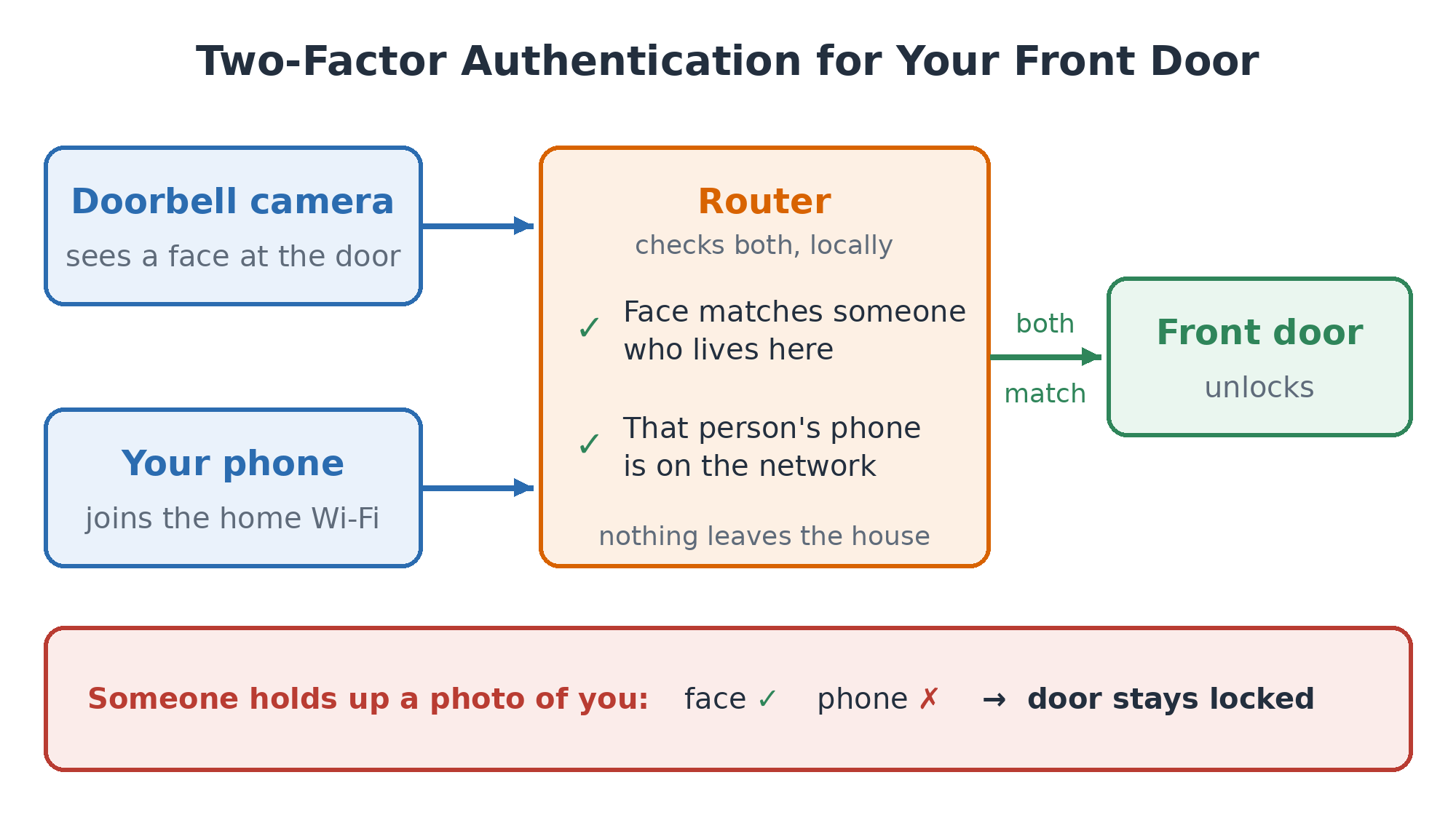
The obvious example is the front door: the doorbell camera sees you coming, the router matches your face, and the lock opens before you find your keys. I wouldn’t do it on the face alone. A camera can’t always tell a face from a good photo of one, and a cheap camera won’t have the 3D sensor your phone uses for face unlock. But the router knows your phone just joined the network. Face plus phone beats either one alone (e.g. MFA for your front door).
Once a cheap device can borrow the router’s model, the list of things worth building gets long. A few:
| Devices | What the router’s model does |
|---|---|
| Driveway camera, garage door or gate | Reads the plate and opens for the family car. Nobody needs a giant cloud AI to read a license plate. |
| Porch camera, phone | “The FedEx driver left a box” instead of “motion detected,” and another alert if someone else walks off with it. |
| Cheap smart speaker | The speaker only listens for its wake word, like “Alexa”; the router does the rest. |
| Smoke and CO alarms, lights, heating and cooling | Any microphone in the house hears the alarm; the router turns on the lights and shuts off the furnace fan so it stops pushing smoke through the ducts. |
| Wi-Fi motion sensing, family alerts | Spots a fall in a parent’s house from the way a body disturbs the Wi-Fi signal, with no camera in the bathroom. Wi-Fi sensing got its own standard, 802.11bf, in 2025. |
Most of these exist today, each locked to one vendor’s app and cloud. The standard would let a camera from one company use a router from another, the way any Wi-Fi phone works with any Wi-Fi router.
Your Laptop Uses the Same Box
Cameras make the easy case, but most of my AI questions come from my laptop. Lenovo’s scope proposal lists laptops as offload clients too, to save battery and run models too big for them. The announcement that lets a camera find the router lets a laptop find the shelf box, so your AI apps can use it by default and go to the cloud only when the policy allows. The software is mostly there: Ollama, a free tool for running models at home, accepts the same requests as OpenAI’s service, so many apps can switch to it by changing one address.
The bigger change is what that box can see. MCP, an open standard for AI apps, lets you plug your calendar or files into a model so it can answer questions about them. At home, you plug in the house: every camera and sensor, what they’ve recorded, and what they can do. Home Assistant, the free home automation platform, already offers its devices to Claude and ChatGPT this way, and the charter’s supporting document describes a router that keeps a directory of the AI agents on the network.
Then your laptop can ask about the house, using data that never left it:
- “Who came to the door while I was out?”
- “Was the garage door open overnight this week?”
- “Are we using more water this month than last?”
A cloud model could answer those too, if you sent it your doorbell footage and your water readings.
Sending Work to the Big Cloud Models Isn’t in the Standard
Some work still wants a frontier model, one of the big cloud AIs like ChatGPT or Claude: summarizing a contract, or anything that needs real reasoning. The standard doesn’t cover sending it there, but it did come up.
Lenovo’s proposal listed handing work to a cloud provider as one possible design, and Huawei argued that the biggest models “have to be deployed on the cloud.” The draft charter went the other way. It only counts a device “capable of fulfilling an AI offload request without further assistance from another device,” which, as I read it, rules out a router that just forwards your request to a cloud service. Cisco’s review said where the AI runs is something ordinary networking already handles.
That’s right for a Wi-Fi standard, and it doesn’t get in the way. The box behind the router can answer what it can and send the rest to the cloud. That’s the idea from my first post, sending each request to the cheapest model that can handle it, moved inside the house.
Home Assistant already works this way by default: its built-in assistant handles commands first, and “only questions or commands it can’t understand will be sent to the AI you’ve set up.” Apple Intelligence runs many models on the device, sends harder requests to “larger, server-based models” on Apple’s servers, and for ChatGPT, “users are asked before any questions are sent.”
| Tier | Where it runs | Typical work | Leaves the house? |
|---|---|---|---|
| Device | The camera, speaker, or glasses | Wake word, motion trigger | No |
| Router | AI chip in the router | Face match, plate read, voice commands | No |
| Shelf box | Plugged into your home network | Your laptop’s questions, the family’s mail and photos | No |
| Cloud | Someone else’s data center | Hard reasoning, long research | Yes, when the house allows it |
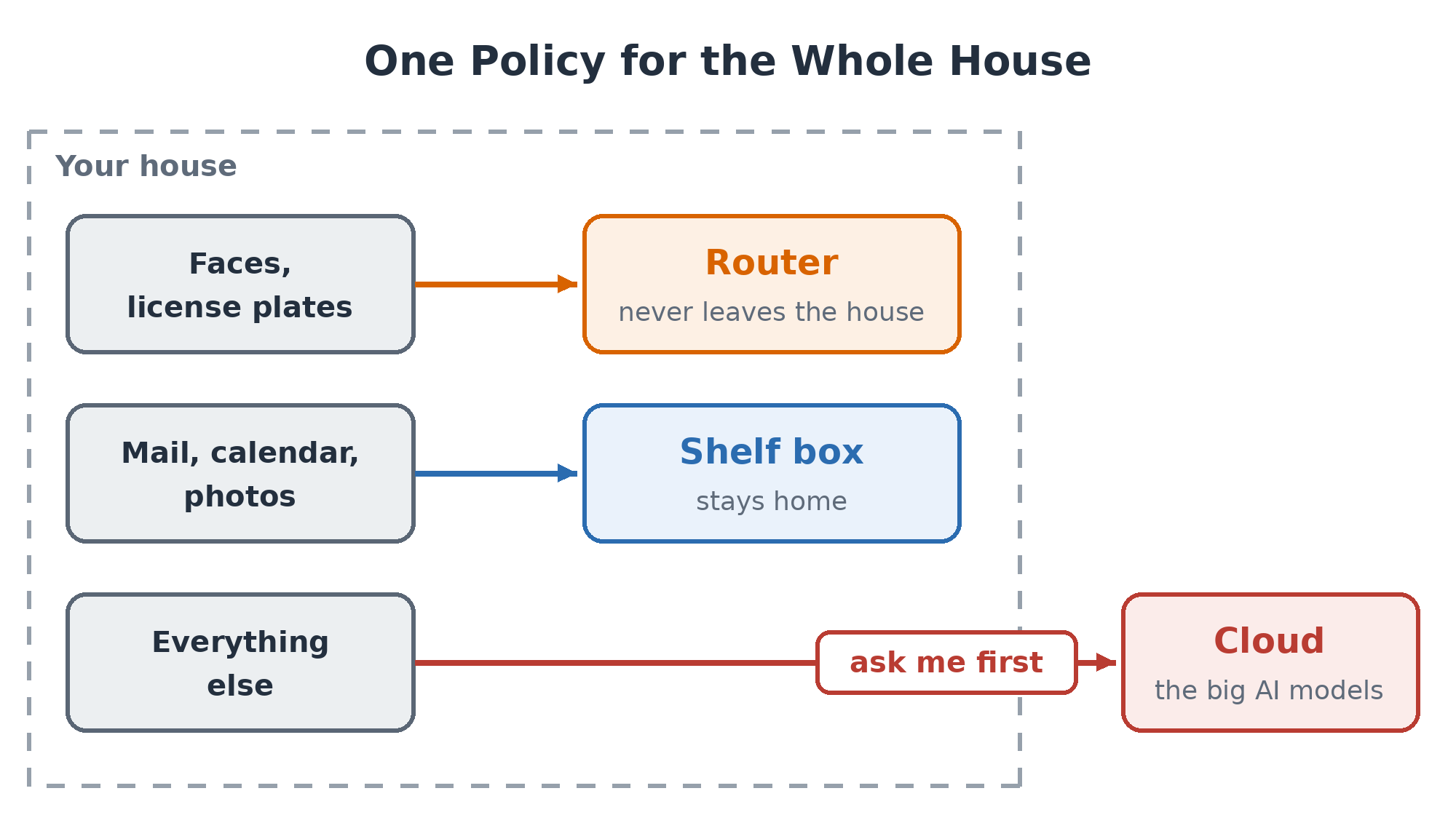
The last column is why I want this. Today each device maker decides what goes to its cloud. If requests leave through the router, the house decides, in one policy. Nothing defines that policy yet; here’s roughly what I’d want mine to say:
The Four Years Before 2030
The chips are in router makers’ hands now. The standard lands in 2030 if the schedule holds, and Wi-Fi schedules tend to slip. Until then, every router maker will ship its own version, every camera maker will pair with whoever pays them, and you’ll get a doorbell that only talks to one brand of router. Smart home hubs have worked that way for a decade.
Memory is still the hard part. An AI chip that reads license plates is cheap; a router with enough memory to run a large AI model costs what I complained about last time. That’s why the clause I care most about is the box plugged into your home network. The router only has to know where the big model is, and the box can sit on the shelf and get cheaper on its own schedule.
If the standard ships close to today’s charter, every device in the house will find the box from my last post the same way it finds the Wi-Fi.